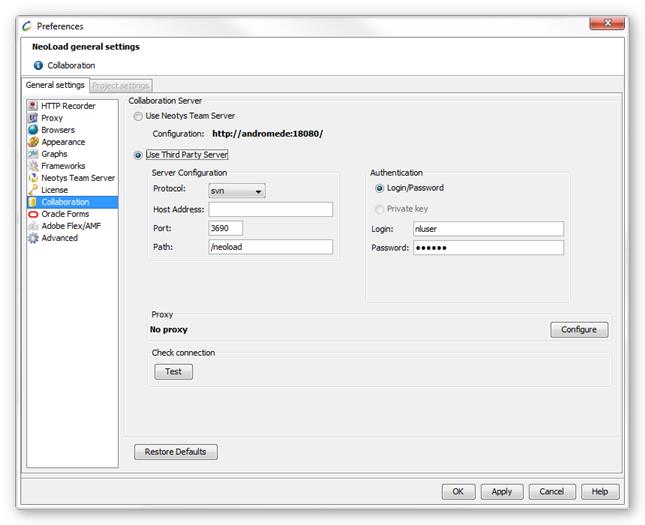
The protocols available to connect to a collaboration server are:
SVN
SVN over HTTP
SVN over HTTPS
SVN over SSH
SVN via a custom tunnel
The Collaboration Server definition group box makes it possible to enter the parameters of the Third Party Server after the protocol selected in Protocol. The Test button helps check the connection. When the parameters specified to connect to the server are inaccurate, an error message is displayed. When the accessed server is in SSH or in tunnel, the message is in the language of the server installation.
Information: A click on the Restore Defaults button sets the Collaboration Server section with the SVN parameters commonly used. Neotys Team Server is the default collaboration server.
SVN connection
To configure a connection to a third-party SVN server, the following fields must be filled in in the Collaborationsection of the General settings:
In the Server Configuration group box:
Protocol: choose svn as the communication protocol.
Host: name of the machine where the SVN server is installed.
Port: communication port (3690 by default).
Path: path of the directory where the projects and the test results are published on the server.
In the Authentication group box:
Login: user login which allows all the publishing operations onto the server.
Password: password which authenticates the user to the server.
In the Proxy group box: When necessary, select the proxy you want to use to connect to the third-party server in SVN mode. For more information, see Proxy.
Use the Test button to check the connection (server configuration, authentication information, proxy settings if any, repository if any).
Warning: Testing a connection does not save the configuration. Do not forget to Apply the changes after completing the test.
SVN connection over HTTP
To configure a connection to a third-party SVN server over HTTP, the following fields must be filled in in the Collaborationsection of the General settings:
In the Server Configuration group box:
Protocol:choose svn/http as the communication protocol.
Host: name of the machine where the SVN server is installed.
Port: communication port (8080 by default).
Path: path of the directory where the projects and the test results are published on the server.
In the Authentication group box:
Login: user login which allows all the publishing operations onto the server.
Password: password which authenticates the user to the server.
In the Proxy group box: When necessary, select the proxy you want to use to connect to the third-party server in HTTP mode. For more information, see Proxy.
Use the Test button to check the connection (server configuration, authentication information, proxy settings if any, repository if any).
Warning: Testing a connection does not save the configuration. Do not forget to Apply the changes after completing the test.
SVN connection over HTTPS
To configure a connection to a third-party SVN server over HTTPS, the following fields must be filled in in the Collaborationsection of the General settings:
In the Server Configuration group box:
Protocol: choose svn/https as the communication protocol.
Host: name of the machine where the SVN server is installed.
Port: communication port (8181 by default).
Path: path of the directory where the projects and the test results are published on the server.
In the Authentication group box:
Login/Password with the fields:
Login: user login which allows all the publishing operations onto the server.
Password: password which authenticates the user to the server.
Private key with the fields:
Login: user login which allows all the publishing operations onto the server.
Password: password which authenticates the user to the server.
Private key: certificate to specify with a click on the selection button.
Passphrase: password to access the certificate.
In the Proxy group box: When necessary, select the proxy you want to use to connect to the third-party server in HTTPS mode. For more information, see Proxy.
Use the Test button to check the connection (server configuration, authentication information, proxy settings if any, repository if any).
Warning: Testing a connection does not save the configuration. Do not forget to Apply the changes after completing the test.
SVN connection over SSH
To configure the connection to a third-party SVN server over SSH, the following fields must be filled in in the Collaborationsection of the General settings:
In the Server Configuration group box:
Protocol:choose svn/ssh as the communication protocol.
Host: name of the machine where the SVN server is installed.
Port: communication port (22 by default).
Path: path of the directory where the projects and the test results are published on the server.
In the Authentication group box:
Login/Password with the fields:
Login: user login which allows all the publishing operations onto the server.
Password: password which authenticates the user to the server.
Private key with the fields:
Login: user login which allows and authenticates all the publishing operations onto the server.
Private key: certificate to specify with a click on the selection button.
Passphrase: password to access the certificate.
In the Proxy group box: When necessary, select the proxy you want to use to connect to the third-party server in HTTP or HTTPS mode. For more information, see Proxy.
Use the Test button to check the connection (server configuration, authentication information, proxy settings if any, repository if any).
Warning: Testing a connection does not save the configuration. Do not forget to Apply the changes after completing the test.
SVN connection via a custom tunnel
To configure the connection to a third-party SVN server via a custom tunnel, the following fields must be filled in in the Collaborationsection of the General settings:
In the Server Configuration group box:
Protocol: choose svn/ssh as the communication protocol and the name of the server specified in the file:
Host: name of the machine where the SVN server is installed.
Port: communication port (22 by default).
Path: path of the directory where the projects and the test results are published on the server.
In the Authentication group box:
Login/Password with the fields:
Login: user login which allows all the publishing operations onto the server.
Password: the password which authenticates the user to the server.
Private key with the fields:
Login: user login which allows and authenticates all the publishing operations onto the server.
Private key: certificate to specify with a click on the selection button.
Passphrase: password to access the certificate.
In the Proxy group box: When necessary, select the proxy you want to use to connect to the third-party server in HTTP or HTTPS mode. For more information, see Proxy.
Use the Test button to check the connection (server configuration, authentication information, proxy settings if any, repository if any).
Warning: Testing a connection does not save the configuration. Do not forget to Apply the changes after completing the test.