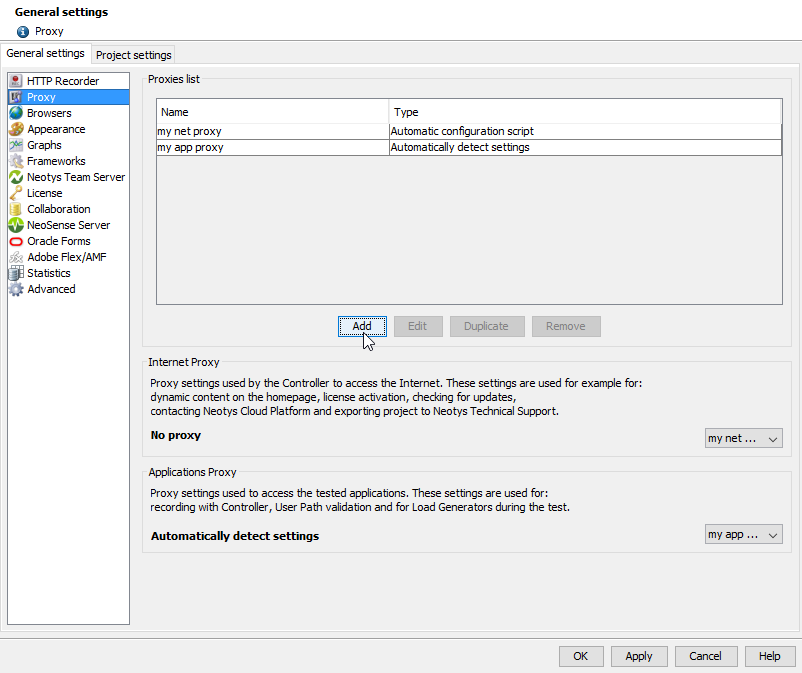
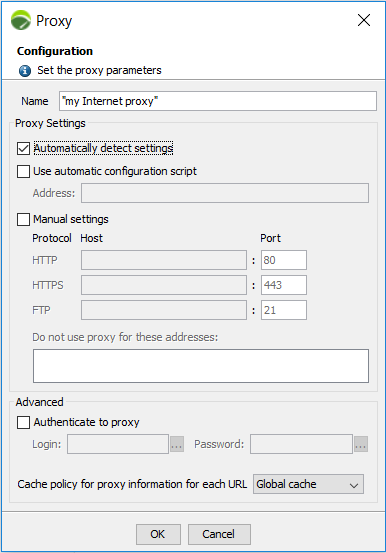
There are 3 methods to configure a proxy. If more than one method is selected, they are prioritized in the following order: auto-detection, auto-configuration, and manual configuration.
- Automatically detect settings
This option automatically detects the proxy settings. It requires implementation of the WPAD protocol over the network (via the DHCP or DNS server). - Use automatic configuration script
With this option, the address of the automated configuration script (PAC file) may be specified, when the network has one. If the URL is incorrect, Neotys Design Studio switches to manual mode or, failing that, does not use a proxy at all. - Manual settings
This option lets you manually enter the addresses (hostname and port) of the HTTP, HTTPS and FTP proxies (the three fields may be identical when one proxy handles all three protocols).Information: FTP is only used for Internet proxy to export projects to the Neotys Technical Support.
Use the list of exceptions to specify the names or IP addresses of the machines for which the proxy must not be used (direct connection).
Each element must be separated by a comma, a semicolon or a space. The "*" (star) character can be used to enter a wild card string. For example, to specify all the machines in themydomain.com*.mydomain.com
- Authentication
Neotys Design Studio handles basic, Digest, NTLM and Negotiate (Kerberos) authentications.Use this option to specify user ID and password required for identification on the proxy. It is possible to pick a variable to make the proxy authentication dynamic with the ellipsis button
 .
. - Cache policy
Information: Cache policy configuration is relevant only for Applications proxy.
This option is linked to the auto-detect and automated script modes. It allows specifying the optimization level to be applied by Neotys Design Studio when executing the automatic configuration script.Since there is only one Virtual User in Neotys Design Studio, Global cache and Virtual User cache options have the same effect.
- Global cache: Proxy settings are shared among all Virtual Users. This is the fastest method, but it can produce distorted results with some complex automated scripts.
- Virtual User cache: The Virtual User uses its own settings.
- No cache: With this option, the automated script is played at each request. This provides the most accurate simulation. This option is useful, for example, in the case of random method load balancing.
You have added a proxy, follow the steps in Use a proxy.