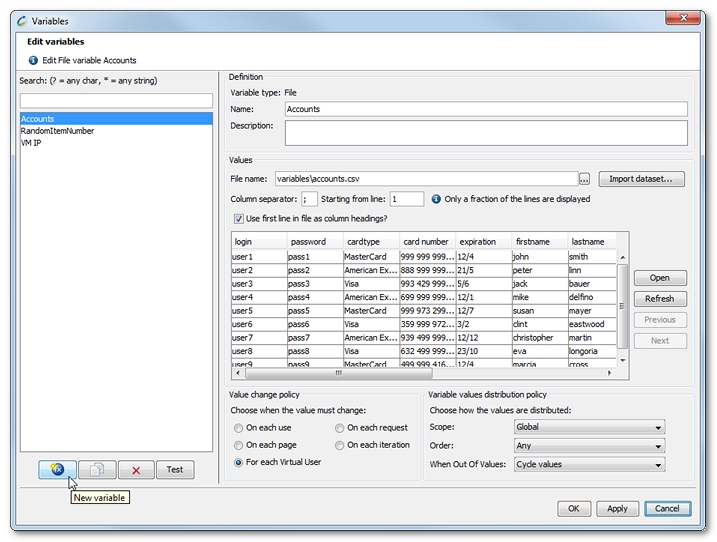
The Variables dialog is accessible:
To create a variable, click the New Variable button.
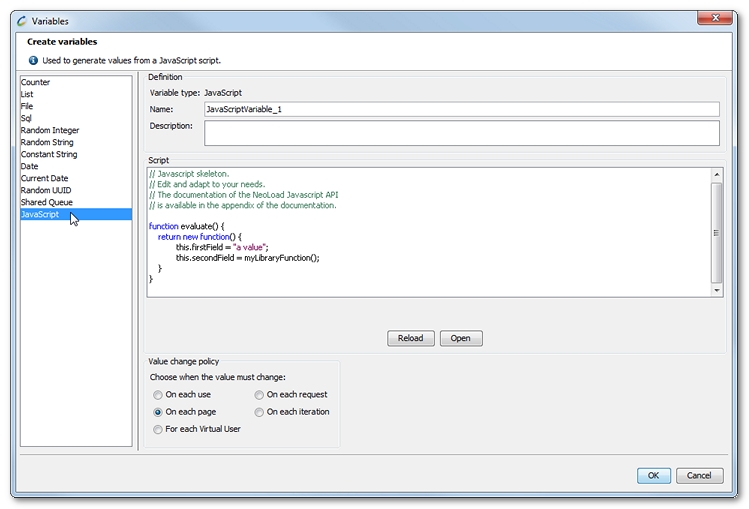
Then select the type of variable you want to create:
${<variable Name>.<columnName>}. For example: ${ListVariable_0.col_0}${accounts.login} can be used instead of the default name ${accounts.col_0}.${<variable Name>.<columnName>}. For example: ${ListVariable_0.col_0}. The first line of the file can be used as columns headers name.The file variable only works with CSV (Comma Separated Values) format files.
SqlTemp subdirectory. The content of the file is updated each time the scenario is launched.Two configurations are possible depending on the database driver selected:
The MySQL, Oracle, DB2, PostgreSQL or Microsoft SQL driver must be selected. In this mode, the following fields must be filled in: host, port, name, user name and password for the database. The MySQL, Oracle and PostgreSQL drivers are available by default.
The Custom driver must be selected. In this instance, the JDBC driver (Java DataBase Connectivity) usually takes the form of a file bearing the .jar extension. This file must be installed in the /lib/jdbcDrivers under the root Neotys Design Studio installation directory. For example: mysql-connector-java-5.0.4-bin.jar
The Driver name is unique to the driver used. For example: com.jdbc.mysql.Driver for mysql.
The complete URL is used to specify the access path to the database. This URL must include at least the following information: host name, port, name, user name and password for the database. For example: jdbc:mysql://localhost:3306/test?user=neotys&password=secret
Only SELECT type requests are authorized within the SQL request. For example: SELECT * FROM users
The Test button allows checking the validity of the database connection information and SQL request.
The test window shows the following items:
XXXXXXXX-XXXX-XXXX-XXXX-XXXXXXXXXXXX format. Can be generated in lower case (default) or upper case.evaluate that returns the variable value.For example:
function evaluate() {
return new function() {
this.firstField = "a value";
this.secondField = myLibraryFunction();
}
}
Variable field values can be accessed by using either the syntax ${<variable name>.col_<field number>} or ${<variable name>.<field name>}
For example: ${JSVariable_0.col_0} or ${JSVariable_0.firstField}
The Neotys Design Studio API and the JavaScript library in the script definition of the variable can be used. For more information, see API overview, and JavaScript libraries.
You can choose at what line to start using your File and List-type variables.
Enter the line number in the Starting from line field.
File and List-type variables may be populated using predefined datasets.
Datasets are organized by themes and countries: zip codes, family names, country names, street names, female first names, male first names, and street types.
All variables (except CurrentDate) may define a value change policy. This is sometimes referred to as a variable lifetime.
Init - Actions - End and for each iteration of the Actions Container, the variable keeping the same value for all the pages and requests within a same iteration.A variable value distribution has three available settings: