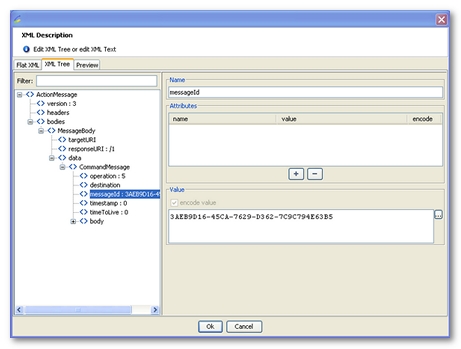
An XML module editing screen makes it possible to edit, and define variables for, the request XML content. This XML content is displayed in an enhanced text field with syntax highlighting.
The text field provides a number of features and keyboard shortcuts:
When the request XML content has been modified, the changes can be saved by clicking on the Apply button. If a problem is detected, an error message notifies of the problem and the changes are ignored. When no problem is detected, the changes are applied.
The text field features an auto-complete function that makes entering variable names easier.
To access the advanced XML editor, it is necessary to select a request, and click on the Advanced XML editor button.
The editor is made of the following tabs:
NeoLoad-encode="false" to the corresponding node, visible in the Flat XML tab. This additional attribute is deleted during the XML encoding phase of the test and is not sent to the server.The Apply button must be clicked to save any changes made to the request.
You may use Neotys Design Studio variables in a request XML content. To do this, you need to use the expression ${VariableName}, which Neotys Design Studio will replace with the value during the test. All the elements in the XML request may be variabilized.
Validating a response in XML format is almost identical to the standard procedure. For more information on how to validate an HTTP request, see Validation.
You may define validations on the XML response using XPath. To recap, XPath is a syntax that points to a portion of an XML document.
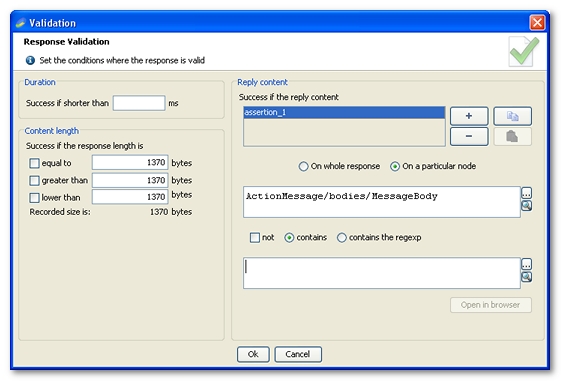
For an XML request, response validators may be created:
This will create an XPath expression based on the selected XML node. You may edit the expression manually, but you must make sure the XPath expression remains valid. The XPath expression may be variabilized.
You will then return to the normal procedure, except that instead of carrying out the validation on the entire server response, it will be done only on the part specified by the XPath expression.
The procedure for extracting variables in XML-format response is almost identical to the standard procedure. For more information about extracting variables in a standard HTTP request, see Variable extractors.
Variable extractors may be defined on an XML node.
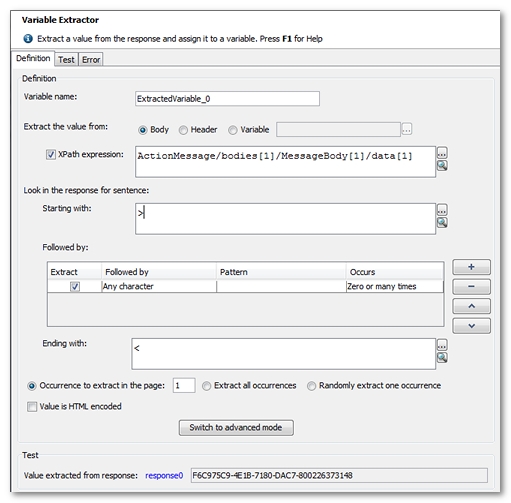
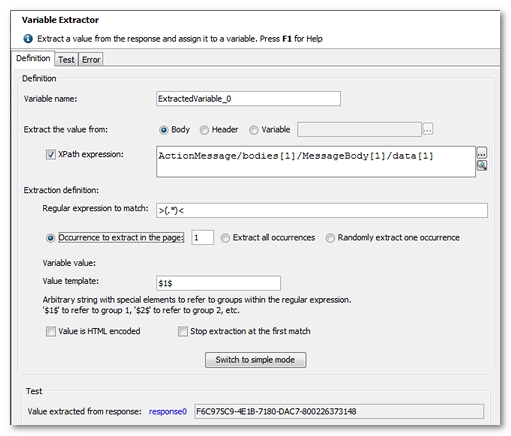
The following screen shots show the normal and advanced variable extraction modes. The red frames highlight the parts that change in the case of an XML request.