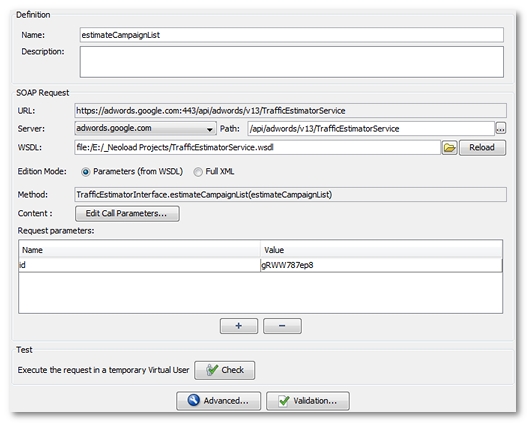
Path. Path to the web service, depending on the selected server.
WSDL. URL for the WSDL. For a file on the hard drive, the URL will take the form file:/C:/... Use the file browse button to select the file. For an online file, use the standard http://myserver/myapp/myservice?WSDL. The Reload button allows the WSDL to be reloaded and to choose a method from the WSDL. It reconfigures the request parameters according to the new selected method. After confirmation, the request original parameters are deleted.
Editing mode.
Parameters (from WSDL) mode This mode is available if a WSDL file has been defined. It allows the call parameters to be entered based on the WSDL definition. For more information, see Edit the parameters extracted from the WSDL.
XML mode This mode allows the request to be edited directly in XML format. For more information, see Edit the XML content.
Method. SOAP Method to be called, cannot be edited directly. Another method can be selected when clicking on the Reload button, if a WSDL is provided.
Content. Edit the WSDL parameters or XML content, depending on the mode selected.
Parameters. URL parameters. For more information, see Request parameters.
Test. Provides a quick way to test the request. Clicking on Check creates a temporary User Path containing the edited request, then launches a User Path check.
Information: The Advanced and Check buttons provide the same features as for a standard HTTP request, allowing the editing of HTTP headers, the creation of variable extractors and the checking of contents.