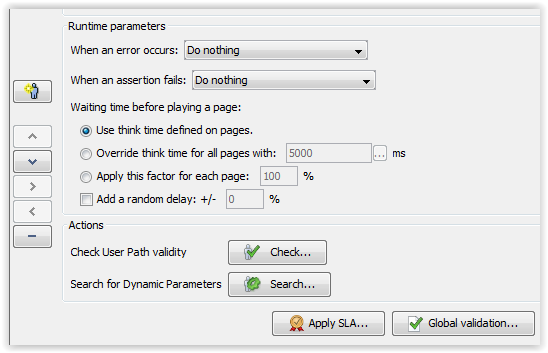
When an error occurs or an assertion fails, a Virtual User continues running by default. However, you may interrupt the Virtual User execution thread when these problems occur by forcing the user to either:
The way this action is carried out depends on the Container being executed at the moment the error occurs, as described in Go to Next Iteration and Stop.
The think time simulates the time spent by a user on the preceding page before accessing the current page. This time delay may be set for each individual page, or globally for all pages.
Think time options are:
Information: With this option, the think time is not executed on the first page of the User Path, if the User Path only contains one page, the think time will not be played at all.
The Add a random delay of +/- X % option can be used to add a random element to the delay. The time delay thus obtained is between delay + x% and delay - x%.
This panel is used to access the following tasks:
The Apply SLA button makes it possible to link an SLA profile to the User Path. For more information, see Link a User Path element to a Service Level Agreement Profile.
The Global validation mechanism allows setting one or more content assertions on all the responses to requests issued by the selected User Path. This means that application validation rules can be defined quickly and easily for all the User Path requests. For more information, see Global validation.