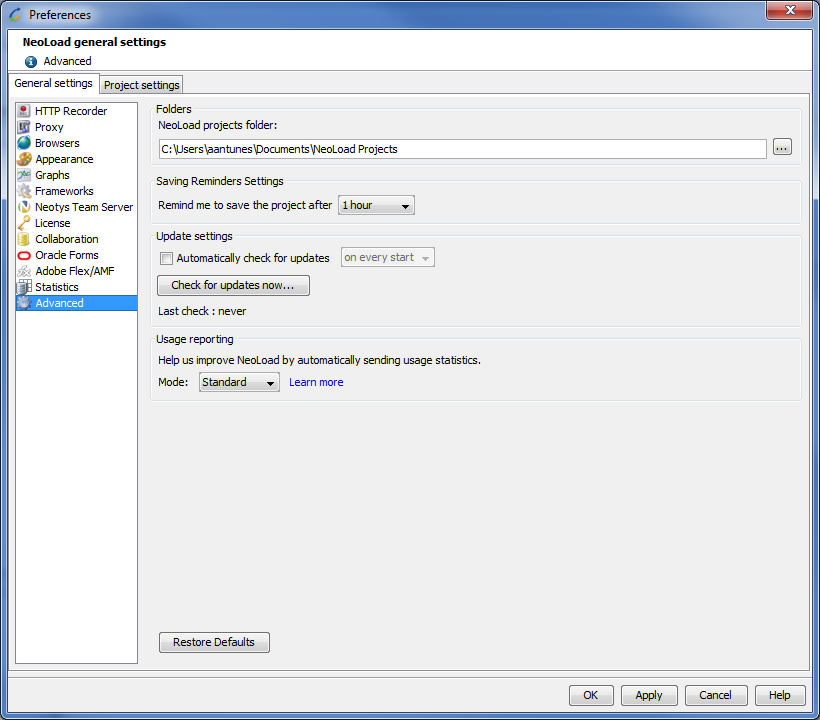
The Advanced section allows you to modify Neotys Design Studio advanced settings.
Folders
You can change the default directory where Neotys Design Studio projects are saved.
Saving Reminders Settings
By default, Neotys Design Studio will remind you to save your project 1 hour after you open it. You can configure it to never get such reminder or choose different durations.
Update settings
The update options make it possible to:
Usage reporting
To continuously improve your experience with Neotys Design Studio 5.5, we perform usage reporting. Collecting and processing usage information enables us to optimize Neotys Design Studio 5.5 functionalities and adapt our content to your needs.
Usage reporting is enabled by default but it can be disabled at any moment. You can select a usage reporting mode to choose the way we collect this information.
Data collected: