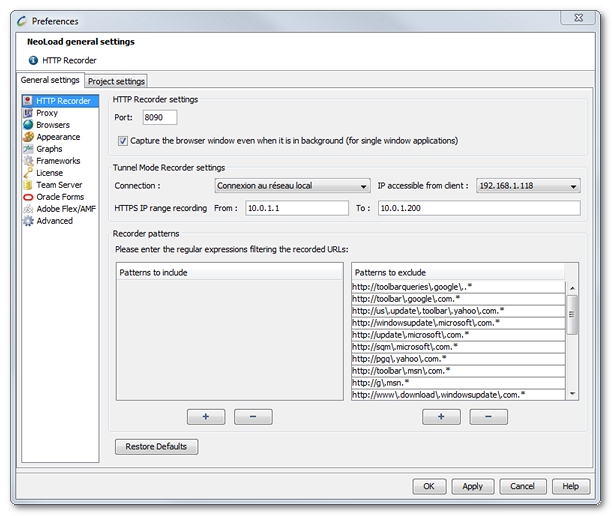
Configuring the HTTP recorder consists in specifying the parameters for the recording proxy and the tunnel mode to capture the requests between the browser and the Web server.
The HTTP Recorder settings group box allows to set the Neotys Design Studio recorder in Proxy mode.
Port is the listening port used by the recorder.
Capture the browser window even when it is in background (for single window applications) can be selected to have the recorder capture only the HTTP flows going through the browser window used. With this option, it is not necessary to close all the HTTP client applications (web sessions with browsers of other types, Twitter client, and so on) or define exclusion rules to avoid unwanted requests in the recording.
The Tunnel Mode Recorder settings group box lists the parameters for the recorder in tunnel mode:
Connection contains the network interface cards available on the machine. A selected card is the one used by the recorder in tunnel mode.
IP accessible from client is the IP to which the tunnel recorder is bound. It is the IP used by the device which connects to the tested application.
HTTPS IP range recording is the collection of IPs which can be used when recording a number of SSL-secured domains. By default, they are local IPs.
In From, it is necessary to enter the first IP of the collection.
In To, the last IP of the collection must be specified.
In Recorder patterns, the regular expression patterns to filter the URLs to be recorded must be entered in the lists:
Patterns to include: When this list contains an entry, Neotys Design Studio only records the URLs matching at least one regular expression pattern. The Patterns to include list is used only to record requests sent to one or two servers.
Patterns to exclude: The request is recorded when it does not match any of the regular expression patterns in the list. The Patterns to exclude list is used to avoid recording requests sent to certain listed servers, or requests for JAR or image files for example. URLs authorized by the Patterns to include list must pass through the exclude filter, otherwise they are rejected.
All filters consist in regular expressions. It is necessary to escape special characters such as the period. A filter can be, for example, http://windowsupdate\.microsoft\.com. For more information, see Regular expressions.
Information: Regular expressions are applied to the full URL, including URL parameters if any.