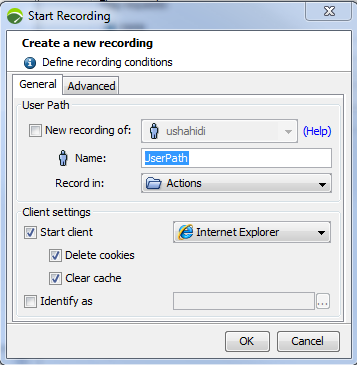
You can start recording an application with:
Starting a new recording creates a new User Path and places all the web pages visited during the recording into that User Path. At the beginning of the recording, the cookies may be deleted and the browser cache may be cleared.
The User Path group box defines the new User Path:
Warning: Init, Actions and End Containers follow a set order of play: 1. Init Container. 2. Actions Container. 3. End Container.
The Client settings group box makes it possible to automatically launch the selected browser and open the test URL http://www.neotys.com/recorder.html?lang=en&port=8090 using the automatically-configured proxy settings. If this page displays correctly, the recording proxy has been properly set up. Closing the browser stops the recording. The Client settings group box also enables you to delete cookies and clear the browser cache before the recording.
lang and port values are dynamic and depend on the settings configured, for the language in Edit > Preferences > General settings > Appearance and for the port in Edit > Preferences > General settings > HTTP Recorder.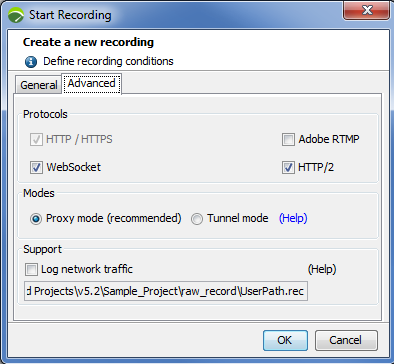
The Protocols group box helps select the protocols which Neotys Design Studio can record. Neotys Design Studio records the HTTP protocol by default:
SPDY is no longer supported and has been replaced by HTTP/2. The focus of HTTP/2 protocol is on performance; specifically, end-user perceived latency, network and server resource usage. One major goal is to allow the use of a single connection from browsers to a Web site. For more information about HTTP/2, see https://http2.github.io/.
The Modes group box makes it possible to choose a recording mode:
The Support group box enables you to save the raw data from your recording for Support purposes.
When asked by Neotys Support, check the Log network traffic option before your recording to make sure raw data recorded is included in the project being exported to Support.
For more information, see Export a project.
The Recording bar enables you to modify the User Path during the recording.

As soon as the Recording bar is displayed, the recording starts. The bar includes the following functions:
A Transaction is used to identify and collect a group of web pages. Delete the Transaction name to end the collection of new pages within the Transaction and to allow the creation of a new Transaction.
Init, Actions and End Container types follow a set order of play: 1. Init Container. 2. Actions Container. 3. End Container.When the recording is finished, the Post-Recording wizard is displayed, as described in Post-recording wizard.