Content:
<form action="doit.jsp" method="post">
<input type="hidden" name="myHiddenField" value="hidden information">
Name: <input name="cn" type="text" value="filled value"><br>
<input name="myRadioField" value="val1" type="radio">Radio Value 1<br>
<input name="myRadioField" value="val2" type="radio" checked="checked">
Radio Value 2<br>
<input type="checkbox" name="myCheckbox" value="checkBoxValue" checked="checked">
A checkbox<br>
<select name="dropDownList">
<option value="val1">list choice 1
<option value="val2" selected>list choice 2
<option value="val3">list choice 3
</select><br>
<input value="Send" type="submit"><input type="reset">
</form>
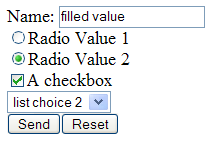
The form looks like this:
Content (value in quotation marks): <input name="cn" type="text" value="filled value">
Regex: <input name="cn" type="text" value="([^"]*)"
Content (value without quotation marks): <input name="cn" type="text" value=myvalue>
Regex: <input name="cn" type="text" value=([^\s>]*)
Comment: In each case, the brackets define the group whose value may be extracted in Neotys Design Studio using $1$.
Advanced case: Where the web page contains several forms with text fields of the same name, the regex must contain the following:
<form action="doit.jsp" method="post">(.|\s)*?<input type=hidden name=myHiddenField value="([^"]*)"Comments:
(.|\s)*? means "any character, including the new line character". "?" means that the first "<input" must be used.([^"]*) means "any character except the quotation mark character '"' ". The brackets are required to define a group. The first group ($1$ in Neotys Design Studio), refers to ''(.|\s)*". However, the second group ($2$ in Neotys Design Studio) also needs to be taken into account.The hidden field is dealt with in a similar way to a normal text field. The input type value "hidden" is substituted for "text".
Content: <input type=hidden name=myHiddenField value="hidden information" >
Regex: <input type=hidden name=myHiddenField value="([^"]*)"
Content: <input name="myRadioField" value="val2" type="radio" checked="checked" >Radio Value 2
Regex: <input name="myRadioField" value="([^"]*)" type="radio" checked="checked" >([^<\n]*)
Comments:
([^"]*) means "any character except the quotation mark character '"' ".([^<\n]*)means "any character except '<' and the new line character ".$1$ in Neotys Design Studio to extract the value and $2$ to extract the label.Content: <input type="checkbox" value="checkBoxValue" name="myCheckbox" checked="checked">A checkbox
Regex: <input type="checkbox" value="([^"]*)" name="myCheckbox" checked="checked">([^<\n]*)
Comments:
([^"]*)means "any character except the quotation mark character '"' ".([^<\n]*)means "any character except '<' and the new line character ".$1$ in Neotys Design Studio to extract the value and $2$ to extract the label.Content:
<select name="dropDownList">
<option value="val1">list choice 1
<option value="val2" selected>list choice 2
<option value="val3">list choice 3
</select>
Regex: <select name="dropDownList">(.|\n)*<option value="([^"]*)" selected>([^<\n]*)
Comments:
(.|\n)* means "any character, including the new line character".[^"]*) means "any character except the quotation mark character '"' ".([^<\n]*)means "any character except '<' and the new line character ".$2$ in Neotys Design Studio to extract the value and $3$ to extract the label.