Neotys Design Studio can record media content requests to provide simulation-specific statistics. The statistics help assess the media content display quality.
Neotys Design Studio supports media requests issued through the HTTP and RTMP communication protocols.
In Neotys Design Studio, a media request on the HTTP protocol is identified by the file extension or the response Content-Type. The parameters are defined in the Project Preferences panel under the Modules Manager category. For more information, see Media Streaming.
In Neotys Design Studio, a media request on the RTMP protocol is identified when the Flash client issues the play command. The command initiates the transfer of video/audio data by the server.
To generate statistics about the media playback, the average downstream rate of the media must be defined in Neotys Design Studio. Neotys Design Studio can figure out the average rate of some codecs: MPEG-4, FLV, F4V, AVI, MP3, and IceCast. For more information, see Media contents.
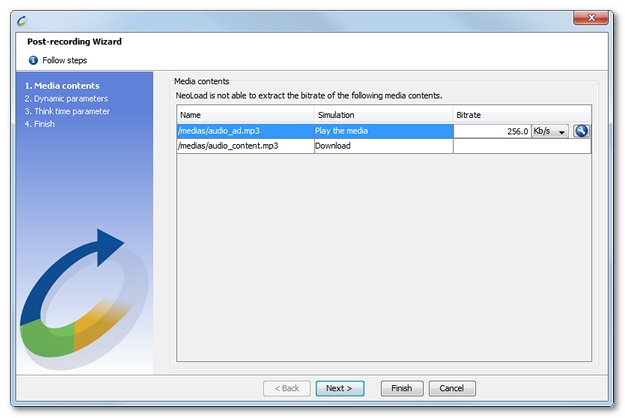
When the average downstream rate cannot be processed in Neotys Design Studio, it is necessary to specify it for each media request. The post-recording wizard lists all the media actions which have been recorded and whose downstream rate is unavailable.
A click on the icon Compute the average bitrate  makes it possible to measure the average downstream rate. The media length in seconds and the overall size of the file must be specified.
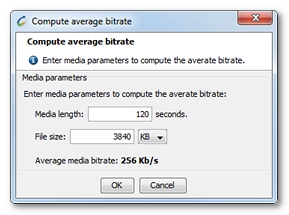
Clicking OK displays the average downstream rate determined by Neotys Design Studio.
to use the Compute average bitrate wizard.