Neotys Design Studio enables you to export your projects to NeoSense. The exported project will directly appear in NeoSense as an Application in the Application Settings section.
Prerequisite: To be able to export a project online, you need to configure the connection to NeoSense beforehand in Edit > Preferences > General settings > NeoSense Server. For more information, see NeoSense Server.
Information: To be exported, a project must contain at least one User Path with one or more non-empty Transactions.
To export a project for NeoSense in online mode
In the menu bar, choose File > Export Project for NeoSense or use the Export your project for NeoSense toolbar button.
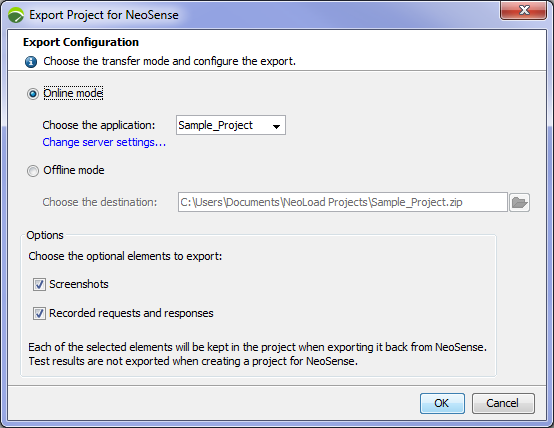
In the Export Project for NeoSense dialog, select Online mode.
Choose the Application that you want to create or update.
The default Application name displayed is the name of the Neotys Design Studio project you are about to export.
The drop-down menu enables you to select a NeoSense Application that you have access to.
Select the optional elements to export: Screenshot and/or Recorded requests and responses if you want to retrieve your project as is from NeoSense to NeoLoad.
Click OK to start the export.
The exported project will directly appear in NeoSense as an Application in the Application Settings section.