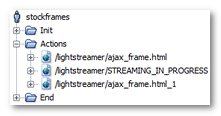
After the recording, a User Path using streaming with the Lightstreamer framework is displayed as follows.
The Lightstreamer streaming request is easily identified, since it ends with the path /STREAMING_IN_PROGRESS.
Once processed by the Neotys Design Studio Post-recording wizard, the User Path is modified as follows.
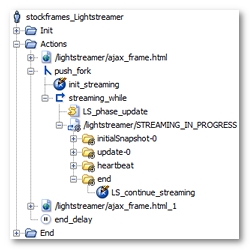
Neotys Design Studio has made the following noticeable changes:
/lightstreamer/STREAMING_IN_PROGRESS for example) has been placed in a loop (streaming_while for example), which continues to loop until the LS_end_streaming variable generated by Neotys Design Studio becomes true (the streaming request can be executed several time if the length of the response is over 300 Kb). Lastly, the loop itself has been placed in a secondary execution thread using a fork action ( push_fork for example).init_streaming initializes the LS_end_streaming variable, with the false value, to have the streaming function work on every Virtual User iteration.initialSnapshot-0 or update-0 for example). The end message is added to the streaming request to handle several executions of the streaming request (if the response length is over 300 Kb).initialSnapshot-X, update-X and heartbeat, where X represents the updated HTML component.LS_phase parameter is handled using the LS_phase Variable Extractor set on the session creation request (creation_session.js for example). A JavaScript action (LS_phase_update for example) increments the value of the LS_phase variable to reproduce the browser behavior. Lastly, this variable is used in the open streaming request (/lightstreamer/STREAMING_IN_PROGRESS for example).