In Neotys Design Studio, the search process for generic dynamic parameters is entirely automated. It allows Neotys Design Studio to search for the dynamic parameters in an application and to modify the scenario accordingly, without using predefined rules.
When the test scenario is recorded, Neotys Design Studio records all the HTTP/S requests sent by the browser to the server. During this recording, Neotys Design Studio also records the current value of all the parameters sent by the browser to the server.
When searching for dynamic parameters, Neotys Design Studio plays back the scenario to find the dynamic parameters present. In each request played back, Neotys Design Studio looks for the corresponding link or form in the previous server response. If the link or form exists, it indicates that all the parameters have remained unchanged between the recording and the moment Neotys Design Studio replayed the scenario, so there are no dynamic parameters for the request. If the link does not exist, it indicates that a parameter value probably has changed between the recording and the time Neotys Design Studio played back the scenario. Neotys Design Studio therefore analyzes the server response to find which parameter value has changed and configures the scenario to handle that parameter.
Depending on the case, Neotys Design Studio uses either variable extractors on the dynamic parameters or link/form extractors to handle dynamic parameters.
An interesting example may be an application containing the dynamic parameter id computed by the server and added as a parameter to a page links. The links in the server response look like this:
<a href="viewCategory.shtml?categoryId=BIRDS&id=1181639214472">BIRDS</a>
<a href="viewCategory.shtml?categoryId=FISH&id=1181639214472">FISH</a>
<a href="viewCategory.shtml?categoryId=DOGS&id=1181639214472">DOGS</a>
<a href="viewCategory.shtml?categoryId=REPTILES&id=1181639214472">REPTILES</a>
<a href="viewCategory.shtml?categoryId=CATS&id=1181639214472">CATS</a>
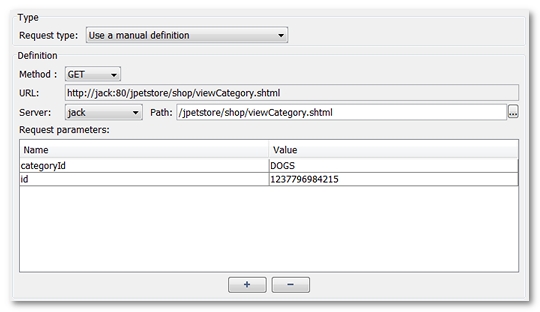
As parameter id is dynamic, it has a different value when executed by each Virtual User. After recording the page, Neotys Design Studio creates a request that includes the parameter value at the time of recording:
During a dynamic parameter search, Neotys Design Studio fails to find this exact link in the server response. However, it will find an identical link with a new value for parameter id. Consequently, Neotys Design Studio offers to manage this dynamic parameter in your scenario:
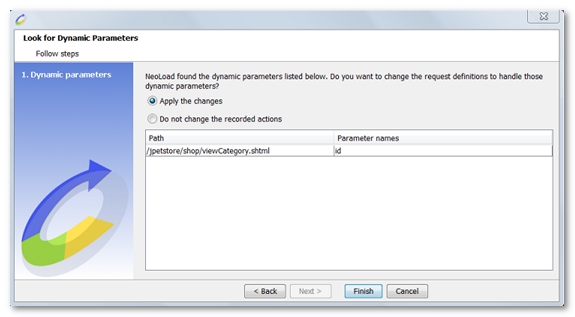
Once the suggested changes have been applied to the scenario, the amended definition of the request concerned by this dynamic parameter will be:
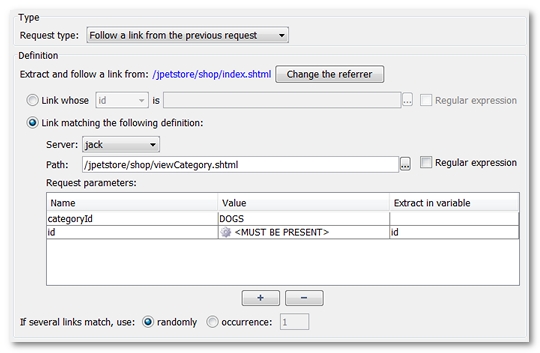
In this amended definition, Neotys Design Studio has changed the request manual definition into a Link Extractor by setting the parameter id as a dynamic parameter (value <MUST BE PRESENT>). Furthermore, Neotys Design Studio will place the value of this dynamic parameter into the variable id when the scenario is run so the variable can be used later on in the scenario.